Difference between revisions of "IPS Display 1.22 inch"
(→Code) |
(→Code - Numeric display -) |
||
| (70 intermediate revisions by 4 users not shown) | |||
| Line 3: | Line 3: | ||
=== Caractéristiques === | === Caractéristiques === | ||
| + | RGB OLED Display 1.22'' <ST7789> v1.0<br> | ||
| + | écran à cristaux liquides de 1,2 pouce<br> | ||
240 x 240 pixels<br> | 240 x 240 pixels<br> | ||
| − | + | l'écran peut afficher jusqu'à 65 000 couleurs RGB <br> | |
3.3V or 5V<br> | 3.3V or 5V<br> | ||
| − | + | l'écran utilise le ST7789 comme circuit intégré de pilotage<br> | |
| + | l'écran utilise la technologie IPS. Quel que soit l'angle de vue, l'expérience visuelle est quasiment identique sous tous les angles. | ||
[[File:1.22 Inch IPS Display 1.PNG|350px]] | [[File:1.22 Inch IPS Display 1.PNG|350px]] | ||
| Line 12: | Line 15: | ||
[[File:1.22 Inch IPS Display 3.PNG|350px]] | [[File:1.22 Inch IPS Display 3.PNG|350px]] | ||
| + | |||
| + | Sa bibliothèque de pilotes open source et son code d'exemple facilitent la prise en main | ||
=== Communication === | === Communication === | ||
| Line 18: | Line 23: | ||
==== Liens externes ==== | ==== Liens externes ==== | ||
| + | |||
| + | https://www.hackster.io/robocircuits/arduino-colored-oled-652ded <font color =red>Exemple</font> | ||
[https://www.seeedstudio.com/Grove-1-2-Inch-IPS-Display-p-5699.html https://www.seeedstudio.com/Grove-1-2-Inch-IPS-Display-p-5699.html] <font color =red>shop</font> | [https://www.seeedstudio.com/Grove-1-2-Inch-IPS-Display-p-5699.html https://www.seeedstudio.com/Grove-1-2-Inch-IPS-Display-p-5699.html] <font color =red>shop</font> | ||
| Line 23: | Line 30: | ||
[https://wiki.seeedstudio.com/grove_1.2inch_ips_display/ wiki.seeedstudio.com/grove_1.2inch] <font color =red>wiki</font> | [https://wiki.seeedstudio.com/grove_1.2inch_ips_display/ wiki.seeedstudio.com/grove_1.2inch] <font color =red>wiki</font> | ||
| − | ==== | + | ==== Bibliothèques ==== |
| + | |||
| + | |||
| + | <b>il faut installer les 3 librairies</b> ici : | ||
| − | |||
https://github.com/adafruit/Adafruit-GFX-Library<br> | https://github.com/adafruit/Adafruit-GFX-Library<br> | ||
https://github.com/adafruit/Adafruit_BusIO<br> | https://github.com/adafruit/Adafruit_BusIO<br> | ||
https://github.com/limengdu/Arduino_ST7789_Fast/tree/master | https://github.com/limengdu/Arduino_ST7789_Fast/tree/master | ||
| + | La librairie <b>Arduino_ST7789_Fast</b> a été mis à jours, en août 2025, veuillez réinstaller la bibliothèque en cas de problème. | ||
| + | |||
| + | Arduino_ST7789_Fast | ||
| + | lcd.setTextColor(GREEN,BLACK); | ||
| + | lcd.setTextColor(BLUE,BLACK); | ||
| + | lcd.setTextColor(RED,BLACK); | ||
| + | |||
| + | ==== Code - HELLO WORLD - ==== | ||
| + | <br> | ||
| + | |||
| + | ---- | ||
| + | |||
| + | [[File:UNO v3 front angle.jpg|150px]] | ||
| + | [[File:Base Shield V2 recto plat.jpg|150px]] | ||
| + | [[File:1.22 Inch IPS Display 1.PNG|150px]] | ||
| + | |||
| + | Arduino IDE 2.3.6<br> | ||
| + | Arduino UNO<br> | ||
| + | Base Shield (5 Volts)<br> | ||
| + | Grove-1.2 Inch IPS Display (Port <b>D7</b>) ✅<br> | ||
| + | Grove-1.2 Inch IPS Display (Port <b>D8</b>) ❌ aucun affichage !<br> | ||
| + | |||
| + | |||
| + | ---- | ||
| + | |||
| + | [[File:Grove Base for XIAO 1.PNG |200px]] | ||
| + | [[File:XIAO RA4M1 4.PNG |125px]] | ||
| + | [[File:1.22 Inch IPS Display 2.PNG |100px]] | ||
| + | |||
| + | Grove Base for XIAO <br> | ||
| + | XIAO-RA4M1 <br> | ||
| + | RGB OLED IPS Display 1.22 inch <ST7789>, Port <b>D7</b> ❌ aucun affichage | ||
| + | ! | ||
| + | |||
| + | |||
| + | ---- | ||
| + | |||
| + | [[File:Seeeduino v4-2.jpg |125px]] | ||
| + | [[File:Base Shield V2 recto plat.jpg |200px]] | ||
| + | [[File:1.22 Inch IPS Display 2.PNG |100px]] | ||
| + | |||
| + | Seeeduino v4-2<br> | ||
| + | Base Shield V2 <b>Port D7</b> ✅<br> | ||
| + | RGB OLED IPS Display 1.22 inch | ||
| + | |||
| + | Librairies : | ||
| + | https://github.com/adafruit/Adafruit-GFX-Library | ||
| + | https://github.com/adafruit/Adafruit_BusIO | ||
| + | https://github.com/limengdu/Arduino_ST7789_Fast/tree/master Arduino_ST7789_Fast a été mis à jours, en août 2025 | ||
<pre> | <pre> | ||
| Line 45: | Line 103: | ||
lcd.fillScreen(BLACK); | lcd.fillScreen(BLACK); | ||
| − | lcd.setCursor( | + | lcd.setCursor(20, 96); |
| − | lcd.setTextColor( | + | lcd.setTextColor(GREEN,BLACK); |
lcd.setTextSize(3); | lcd.setTextSize(3); | ||
lcd.println("HELLO WORLD"); | lcd.println("HELLO WORLD"); | ||
| Line 56: | Line 114: | ||
} | } | ||
</pre> | </pre> | ||
| + | |||
| + | ---- | ||
| + | |||
| + | |||
| + | [[File:IPS-Display 2.jpg |125px]] | ||
| + | |||
| + | ==== Code - Numeric display - ==== | ||
| + | <br> | ||
| + | |||
| + | ---- | ||
| + | |||
| + | [[File:Seeeduino v4-2.jpg |125px]] | ||
| + | [[File:Base Shield V2 recto plat.jpg |200px]] | ||
| + | [[File:1.22 Inch IPS Display 2.PNG |100px]] | ||
| + | |||
| + | Seeeduino v4-2<br> | ||
| + | Base Shield V2 <b>Port D7</b> ✅<br> | ||
| + | RGB OLED IPS Display 1.22 inch | ||
| + | |||
| + | Librairies : | ||
| + | https://github.com/adafruit/Adafruit-GFX-Library | ||
| + | https://github.com/adafruit/Adafruit_BusIO | ||
| + | https://github.com/limengdu/Arduino_ST7789_Fast/tree/master Arduino_ST7789_Fast a été mis à jours, en août 2025 | ||
| + | https://github.com/cbm80amiga/RREFont | ||
| + | |||
| + | <pre> | ||
| + | // ST7789 library example | ||
| + | // Numeric display - RREFont vs PropFont | ||
| + | // (c) 2020 Pawel A. Hernik | ||
| + | // YouTube videos: | ||
| + | // https://youtu.be/OOvzmHcou4E | ||
| + | // https://youtu.be/-F7EWPt0yIo | ||
| + | |||
| + | |||
| + | |||
| + | #include <SPI.h> | ||
| + | #include <Adafruit_GFX.h> | ||
| + | |||
| + | #include <Adafruit_GFX.h> | ||
| + | #include <Arduino_ST7789_Fast.h> | ||
| + | |||
| + | #define SCK 7 | ||
| + | #define SDA 8 | ||
| + | |||
| + | Arduino_ST7789 lcd = Arduino_ST7789(SCK, SDA); | ||
| + | |||
| + | // define what kind of fonts should be used | ||
| + | #define USE_RRE_FONTS 1 | ||
| + | |||
| + | #if USE_RRE_FONTS==1 | ||
| + | |||
| + | #include "RREFont.h" | ||
| + | #include "rre_term_10x16.h" | ||
| + | #include "rre_bold13x20.h" | ||
| + | #include "rre_bold13x20v.h" | ||
| + | #include "rre_bold13x20no.h" | ||
| + | |||
| + | RREFont font; | ||
| + | // needed for RREFont library initialization, define your fillRect | ||
| + | void customRect(int x, int y, int w, int h, int c) { return lcd.fillRect(x, y, w, h, c); } | ||
| + | |||
| + | #else | ||
| + | |||
| + | #include "PropFont.h" | ||
| + | #include "bold13x20digtop_font.h" | ||
| + | #include "term9x14_font.h" | ||
| + | |||
| + | PropFont font; | ||
| + | // needed for PropFont library initialization, define your drawPixel and fillRect | ||
| + | void customPixel(int x, int y, int c) { lcd.drawPixel(x, y, c); } | ||
| + | void customRect(int x, int y, int w, int h, int c) { lcd.fillRect(x, y, w, h, c); } | ||
| + | #endif | ||
| + | |||
| + | //----------------------------------------------------------------------------- | ||
| + | |||
| + | unsigned long ms = 0; | ||
| + | |||
| + | void setup() | ||
| + | { | ||
| + | Serial.begin(9600); | ||
| + | lcd.init(); | ||
| + | font.init(customRect, 240, 240); // custom fillRect function and screen width and height values | ||
| + | } | ||
| + | |||
| + | const uint16_t lnCol = RGBto565(255,150,255); | ||
| + | const uint16_t ln2Col = RGBto565(180,180,180); | ||
| + | const uint16_t labCol = RGBto565(250,250,250); | ||
| + | const uint16_t v1Col = RGBto565(100,250,100); | ||
| + | const uint16_t v2Col = RGBto565(255,250,100); | ||
| + | const uint16_t v3Col = RGBto565(120,255,255); | ||
| + | const uint16_t v4Col = RGBto565(255,120,120); | ||
| + | const uint16_t v5Col = RGBto565(150,150,255); | ||
| + | //const uint16_t v5Col = RGBto565(250,150,250); | ||
| + | int mode=0,lastMode=-1; | ||
| + | |||
| + | void setBigNumFont() | ||
| + | { | ||
| + | #if USE_RRE_FONTS==1 | ||
| + | font.setFont(&rre_Bold13x20v); | ||
| + | //font.setFont(&rre_Bold13x20); // regular RRE rendered with rectangles | ||
| + | //font.setFont(&rre_Bold13x20no); // like above but no overlapping | ||
| + | #else | ||
| + | font.setFont(Bold13x20); | ||
| + | #endif | ||
| + | font.setSpacing(1); | ||
| + | font.setScale(1,2); | ||
| + | font.setDigitMinWd(16); | ||
| + | } | ||
| + | |||
| + | void setInfoFont() | ||
| + | { | ||
| + | #if USE_RRE_FONTS==1 | ||
| + | font.setFont(&rre_term_10x16); | ||
| + | #else | ||
| + | font.setFont(Term9x14); | ||
| + | #endif | ||
| + | } | ||
| + | |||
| + | void drawField(int x, int y, int w, int h, char *label, uint16_t col=lnCol) | ||
| + | { | ||
| + | lcd.drawRect(x,y+7,w,h-7,col); | ||
| + | setInfoFont(); | ||
| + | font.setScale(1); | ||
| + | font.setColor(labCol,BLACK); | ||
| + | int wl = font.strWidth(label); | ||
| + | font.printStr(x+(w-wl)/2,y,label); | ||
| + | } | ||
| + | |||
| + | void showVal(float v, int x, int y, int w, int p, uint16_t col) | ||
| + | { | ||
| + | setBigNumFont(); | ||
| + | font.setColor(col,BLACK); | ||
| + | char txt[10]; | ||
| + | dtostrf(v,w,p,txt); | ||
| + | font.printStr(x,y,txt); | ||
| + | } | ||
| + | |||
| + | void constData() | ||
| + | { | ||
| + | drawField( 0, 0,120-5,80-2," Temp "); | ||
| + | drawField(120+5, 0,120-5,80-2," Time "); | ||
| + | drawField( 0, 81,120-5,80-2," Pressure "); | ||
| + | drawField(120+5, 81,120-5,80-2," Altitude "); | ||
| + | drawField( 0,162,240,80-2," Big Number ",ln2Col); | ||
| + | setBigNumFont(); | ||
| + | int wv=font.strWidth("88.8"); | ||
| + | font.setColor(v1Col); font.printStr(18+wv,0+24,"'$"); | ||
| + | wv=font.strWidth("999999999.99"); | ||
| + | font.setColor(v5Col); font.printStr(22+wv,162+25,"'"); | ||
| + | wv=font.strWidth("888.8"); | ||
| + | int wv2=font.strWidth("888"); | ||
| + | setInfoFont(); | ||
| + | font.setScale(1,2); | ||
| + | font.setColor(v4Col); font.printStr(21+120+wv+2,82+22+14,"m"); | ||
| + | font.setColor(v2Col); font.printStr(32+120+wv2+3,24+12,"ms"); | ||
| + | } | ||
| + | |||
| + | float v1,v3,v4,v5; | ||
| + | int tm = 0; | ||
| + | |||
| + | void varData() | ||
| + | { | ||
| + | //v1=88.8; v3=8888.8; v4=888.8; v5=8888888.88; | ||
| + | // PropFont optimizing: noopt=350ms, ff=317ms, 0+ff=298ms, +f0=290ms +0f=277ms | ||
| + | showVal(v1, 18,0+24, 4,1, v1Col); | ||
| + | showVal(tm, 32+120,0+24, 3,0, v2Col); | ||
| + | showVal(v3, 14,82+24, 6,1, v3Col); | ||
| + | showVal(v4, 21+120,82+24, 5,1, v4Col); | ||
| + | showVal(v5, 22,162+25, 12,2, v5Col); | ||
| + | v1+=1.1; if(v1>99.0) v1=0; | ||
| + | v3+=10.1; if(v3>9999.0) v3=0; | ||
| + | v4+=3.3; if(v4>999.0) v4=0; | ||
| + | v5+=941340.32; if(v5>=999999999.99) v5=0; | ||
| + | } | ||
| + | |||
| + | void loop() | ||
| + | { | ||
| + | if(mode!=lastMode) { | ||
| + | lastMode=mode; | ||
| + | lcd.fillScreen(BLACK); | ||
| + | constData(); | ||
| + | } | ||
| + | ms = millis(); | ||
| + | varData(); | ||
| + | tm = millis()-ms; | ||
| + | Serial.println(tm); | ||
| + | } | ||
| + | </pre> | ||
| + | <br> | ||
| + | |||
| + | ---- | ||
| + | |||
| + | |||
| + | [[File:IPS-Display 3.jpg |125px]] | ||
| + | |||
| + | |||
| + | ---- | ||
| + | <br> | ||
https://github.com/adafruit/Adafruit-ST7735-Library/tree/master | https://github.com/adafruit/Adafruit-ST7735-Library/tree/master | ||
| + | La Libraire <b>Adafruit_ST7789.h</b> ne fonctionne pas ici ❌ | ||
| + | |||
<pre> | <pre> | ||
| Line 63: | Line 321: | ||
#include <Adafruit_ST7789.h> // library for this display | #include <Adafruit_ST7789.h> // library for this display | ||
#include <SPI.h> | #include <SPI.h> | ||
| − | #define TFT_CS | + | |
| − | #define | + | #define TFT_CS 7 // if your display has CS pin |
| − | #define | + | #define TFT_DC 8 // data pin |
| + | |||
| + | |||
| + | #define TFT_RST -1 // reset pin | ||
Adafruit_ST7789 tft = Adafruit_ST7789(TFT_CS, TFT_DC, TFT_RST); | Adafruit_ST7789 tft = Adafruit_ST7789(TFT_CS, TFT_DC, TFT_RST); | ||
Latest revision as of 15:31, 6 November 2025
Contents
Grove - IPS Display 1.22 inch (Seeed-Studio)
Caractéristiques
RGB OLED Display 1.22 <ST7789> v1.0
écran à cristaux liquides de 1,2 pouce
240 x 240 pixels
l'écran peut afficher jusqu'à 65 000 couleurs RGB
3.3V or 5V
l'écran utilise le ST7789 comme circuit intégré de pilotage
l'écran utilise la technologie IPS. Quel que soit l'angle de vue, l'expérience visuelle est quasiment identique sous tous les angles.


Sa bibliothèque de pilotes open source et son code d'exemple facilitent la prise en main
Communication
D7 (D7/D8) port
Liens externes
https://www.hackster.io/robocircuits/arduino-colored-oled-652ded Exemple
https://www.seeedstudio.com/Grove-1-2-Inch-IPS-Display-p-5699.html shop
wiki.seeedstudio.com/grove_1.2inch wiki
Bibliothèques
il faut installer les 3 librairies ici :
https://github.com/adafruit/Adafruit-GFX-Library
https://github.com/adafruit/Adafruit_BusIO
https://github.com/limengdu/Arduino_ST7789_Fast/tree/master
La librairie Arduino_ST7789_Fast a été mis à jours, en août 2025, veuillez réinstaller la bibliothèque en cas de problème.
Arduino_ST7789_Fast
lcd.setTextColor(GREEN,BLACK);
lcd.setTextColor(BLUE,BLACK);
lcd.setTextColor(RED,BLACK);
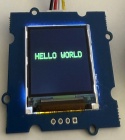
Code - HELLO WORLD -


Arduino IDE 2.3.6
Arduino UNO
Base Shield (5 Volts)
Grove-1.2 Inch IPS Display (Port D7) ✅
Grove-1.2 Inch IPS Display (Port D8) ❌ aucun affichage !


Grove Base for XIAO
XIAO-RA4M1
RGB OLED IPS Display 1.22 inch <ST7789>, Port D7 ❌ aucun affichage
!

Seeeduino v4-2
Base Shield V2 Port D7 ✅
RGB OLED IPS Display 1.22 inch
Librairies :
https://github.com/adafruit/Adafruit-GFX-Library
https://github.com/adafruit/Adafruit_BusIO
https://github.com/limengdu/Arduino_ST7789_Fast/tree/master Arduino_ST7789_Fast a été mis à jours, en août 2025
#include <Adafruit_GFX.h>
#include <Arduino_ST7789_Fast.h>

#define SCK   7
#define SDA   8

Arduino_ST7789 lcd = Arduino_ST7789(SCK, SDA);

void setup(void)
{
    lcd.init();
    lcd.fillScreen(BLACK);

    lcd.setCursor(20, 96);
    lcd.setTextColor(GREEN,BLACK);
    lcd.setTextSize(3);
    lcd.println("HELLO WORLD");
}

void loop()
{

}

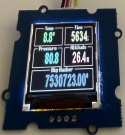
Code - Numeric display -
Seeeduino v4-2
Base Shield V2 Port D7 ✅
RGB OLED IPS Display 1.22 inch
Librairies :
https://github.com/adafruit/Adafruit-GFX-Library
https://github.com/adafruit/Adafruit_BusIO
https://github.com/limengdu/Arduino_ST7789_Fast/tree/master Arduino_ST7789_Fast a été mis à jours, en août 2025
https://github.com/cbm80amiga/RREFont
// ST7789 library example
// Numeric display - RREFont vs PropFont
// (c) 2020 Pawel A. Hernik
// YouTube videos:
// https://youtu.be/OOvzmHcou4E
// https://youtu.be/-F7EWPt0yIo


#include <SPI.h>
#include <Adafruit_GFX.h>

#include <Adafruit_GFX.h>
#include <Arduino_ST7789_Fast.h>

#define SCK   7
#define SDA   8

Arduino_ST7789 lcd = Arduino_ST7789(SCK, SDA);

// define what kind of fonts should be used
#define USE_RRE_FONTS 1

#if USE_RRE_FONTS==1

#include "RREFont.h"
#include "rre_term_10x16.h"
#include "rre_bold13x20.h"
#include "rre_bold13x20v.h"
#include "rre_bold13x20no.h"

RREFont font;
// needed for RREFont library initialization, define your fillRect
void customRect(int x, int y, int w, int h, int c) { return lcd.fillRect(x, y, w, h, c); }

#else

#include "PropFont.h"
#include "bold13x20digtop_font.h"
#include "term9x14_font.h"

PropFont font;
// needed for PropFont library initialization, define your drawPixel and fillRect
void customPixel(int x, int y, int c) { lcd.drawPixel(x, y, c); }
void customRect(int x, int y, int w, int h, int c) { lcd.fillRect(x, y, w, h, c); }
#endif

//-----------------------------------------------------------------------------

unsigned long ms = 0;

void setup()
{
    Serial.begin(9600);
    lcd.init();
    font.init(customRect, 240, 240); // custom fillRect function and screen width and height values
}

const uint16_t lnCol  = RGBto565(255,150,255);
const uint16_t ln2Col = RGBto565(180,180,180);
const uint16_t labCol = RGBto565(250,250,250);
const uint16_t v1Col  = RGBto565(100,250,100);
const uint16_t v2Col  = RGBto565(255,250,100);
const uint16_t v3Col  = RGBto565(120,255,255);
const uint16_t v4Col  = RGBto565(255,120,120);
const uint16_t v5Col  = RGBto565(150,150,255);
//const uint16_t v5Col  = RGBto565(250,150,250);
int mode=0,lastMode=-1;

void setBigNumFont()
{
#if USE_RRE_FONTS==1
    font.setFont(&rre_Bold13x20v);
    //font.setFont(&rre_Bold13x20);  // regular RRE rendered with rectangles
    //font.setFont(&rre_Bold13x20no);  // like above but no overlapping
#else
    font.setFont(Bold13x20);
#endif
    font.setSpacing(1);
    font.setScale(1,2);
    font.setDigitMinWd(16);
}

void setInfoFont()
{
#if USE_RRE_FONTS==1
    font.setFont(&rre_term_10x16);
#else
    font.setFont(Term9x14);
#endif
}

void drawField(int x, int y, int w, int h, char *label, uint16_t col=lnCol)
{
    lcd.drawRect(x,y+7,w,h-7,col);
    setInfoFont();
    font.setScale(1);
    font.setColor(labCol,BLACK);
    int wl = font.strWidth(label);
    font.printStr(x+(w-wl)/2,y,label);
}

void showVal(float v, int x, int y, int w,  int p, uint16_t col)
{
    setBigNumFont();
    font.setColor(col,BLACK);
    char txt[10];
    dtostrf(v,w,p,txt);
    font.printStr(x,y,txt);
}

void constData()
{
    drawField(    0,  0,120-5,80-2," Temp ");
    drawField(120+5,  0,120-5,80-2," Time ");
    drawField(    0, 81,120-5,80-2," Pressure ");
    drawField(120+5, 81,120-5,80-2," Altitude ");
    drawField(    0,162,240,80-2," Big Number ",ln2Col);
    setBigNumFont();
    int wv=font.strWidth("88.8");
    font.setColor(v1Col); font.printStr(18+wv,0+24,"'$");
    wv=font.strWidth("999999999.99");
    font.setColor(v5Col); font.printStr(22+wv,162+25,"'");
    wv=font.strWidth("888.8");
    int wv2=font.strWidth("888");
    setInfoFont();
    font.setScale(1,2);
    font.setColor(v4Col); font.printStr(21+120+wv+2,82+22+14,"m");
    font.setColor(v2Col); font.printStr(32+120+wv2+3,24+12,"ms");
}

float v1,v3,v4,v5;
int tm = 0;

void varData()
{
    //v1=88.8; v3=8888.8; v4=888.8; v5=8888888.88;
    // PropFont optimizing: noopt=350ms, ff=317ms, 0+ff=298ms, +f0=290ms +0f=277ms
    showVal(v1, 18,0+24, 4,1, v1Col);
    showVal(tm, 32+120,0+24, 3,0, v2Col);
    showVal(v3, 14,82+24, 6,1, v3Col);
    showVal(v4, 21+120,82+24, 5,1, v4Col);
    showVal(v5, 22,162+25, 12,2, v5Col);
    v1+=1.1; if(v1>99.0) v1=0;
    v3+=10.1; if(v3>9999.0) v3=0;
    v4+=3.3; if(v4>999.0) v4=0;
    v5+=941340.32; if(v5>=999999999.99) v5=0;
}

void loop()
{
    if(mode!=lastMode) {
        lastMode=mode;
        lcd.fillScreen(BLACK);
        constData();
    }
    ms = millis();
    varData();
    tm = millis()-ms;
    Serial.println(tm);
}

https://github.com/adafruit/Adafruit-ST7735-Library/tree/master La Libraire Adafruit_ST7789.h ne fonctionne pas ici ❌
#include <Adafruit_GFX.h> // graphics library
#include <Adafruit_ST7789.h> // library for this display
#include <SPI.h>

#define TFT_CS 7 // if your display has CS pin
#define TFT_DC 8  // data pin


#define TFT_RST -1 // reset pin

Adafruit_ST7789 tft = Adafruit_ST7789(TFT_CS, TFT_DC, TFT_RST);

void setup() {
  tft.init(240, 240, SPI_MODE2);
  tft.setRotation(2); // rotates the screen
  tft.fillScreen(ST77XX_BLACK); // fills the screen with black colour
  tft.setCursor(10, 10); // starts to write text at y10 x10
  tft.setTextColor(ST77XX_WHITE); // text colour to white you can use hex codes like 0xDAB420 too
  tft.setTextSize(3); // sets font size
  tft.setTextWrap(true);
  tft.print("HELLO WORLD!");
}
void loop() {

  }
